Let the Command Terminal write your next board task
Sketch the idea in plain language, let the agent investigate the code and file the task over MCP, then hand the prompt it wrote to a fresh implementation agent.
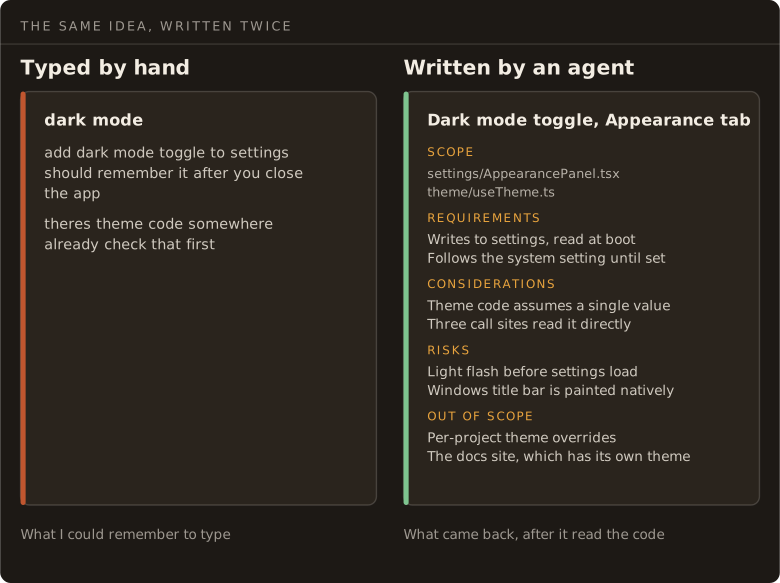
Most of my board tasks used to start the same way. I had an idea, clicked the plus on a column, and typed three lines of whatever was in my head. No punctuation, no file names, no thought about scope. Just enough to remind me later what I had meant.
Then I dragged the card and watched the agent go looking for things I already knew. It grepped for theme, found two candidates, picked the wrong one, backed out. The plan I actually had in my head never made it into the prompt, so the agent rebuilt a worse version of it from scratch.
The recipe
Now I open a Command Terminal instead. Ctrl+Shift+P on Windows and Linux, Cmd+Shift+P on macOS, or the terminal icon in the title bar. It spawns a session at the project root on your default base branch, after a git fetch and a fast-forward. It creates no task, and stopping it destroys it for good. One click in, one click out.


Then I describe the idea the way I would describe it to a person:
I want to add a dark mode toggle to the settings panel. Investigate what this would take and let’s create a follow-up task on the board.
That is the whole prompt. I do not write the task. The agent does.
Most of the time I talk it rather than type it. Dictation is push-to-talk and a focused Command Terminal is one of its targets, so I hold the key and say it out loud instead. It runs on-device by default, with no API key to set up. Talking is what gets the detail in. I will ramble for a minute about the feature, the part I am unsure about, the thing I am worried it will break, and then finish with “create this task on the board”. That closing instruction can be thin because the session already knows which board it is filing to.
What comes back
The agent reads the code first, then files the card through kangentic_create_task. With no column argument it lands in To Do.
What arrives is not three lines. It is file references, scope, requirements, and the risks the agent noticed while it was reading. I have the same request written both ways in front of me. Typed from memory it is 143 characters. Written by the agent after it read the code it is 4,029, across five labelled sections that include the files to change and what to leave alone.
Labels come out better too, because the agent can call kangentic_board_summary first and read the vocabulary the board already has. Mine carries both landing-page and landing page, which is the near-duplicate that call exists to prevent.
The questions come first
Before any of that, the agent usually asks me something. Which settings panel. Whether the toggle should follow the system preference. Whether existing users keep the theme they already have.
Those questions come from Claude Code, not from Kangentic. Most agent CLIs do some version of it. What Kangentic contributes is a session that opens in one click and costs nothing to throw away, so the scoping happens somewhere cheap. The terminal ends up working as a pre-planning pass ahead of plan mode, and the answers get written into the task instead of staying in my head.
Sometimes what I thought was one task comes back as three, because the agent read the code and decided a phased rollout was safer. I did not ask for the split. I would not always have thought of it.
Drag the card
Then I drag the card into a column that starts an agent.
The implementation agent starts on fresh context with that whole description as its first message. It is not working from what I could remember to type. It is working from what another agent found by reading the code, including the parts I would have left out.
The MCP server is the part that matters
None of this works without the board tools on the other end. The terminal agent can read the code and reason about scope all it likes, but if it cannot file the result, I am back to copying a description into a form by hand. kangentic_create_task is one of 63 tools the built-in MCP server exposes, and the rest of the board is reachable the same way. List the columns, read the labels, move a card, update a description.
The connection carries the project in its own URL, which is why “create this task on the board” is a complete instruction. The agent does not have to be told which board, or be handed an id, or be trusted to guess from the working directory. It asks the server it is already wired to.
That binding is the one thing to watch if you keep several projects registered. Leaving the optional project argument off means the project the session belongs to, which is what you want nearly every time. Name it only when you mean a different board. Two of mine differ by a single TLD.
Filing everything this way changed my habits more than I expected it to. This started as a way to get one better prompt for one task. It is now how I file everything. I almost never click the plus button any more, and when I do it feels like a step backwards. If I am already talking to an agent about a piece of work, the context is sitting right there in the conversation. Retyping a summary of it into a dialog throws that away and asks me to remember, badly, what the agent already knows.
Why this works
Frontier models reward better instructions, and the stronger they get the more they reward them. Hand Opus 5 or Fable 5.1 a paragraph of real constraints and it will do something careful with it. The bottleneck was never the model’s willingness to follow a good brief. It is that writing one is work, and at the moment you have the idea you are the least equipped person to write it, because you have not read the code yet.
The agent has, or can, in about two minutes. So a task that names the files, states the scope, and lists what could go wrong produces an implementation closer to what I wanted. The agent is not guessing at what I meant, because the guessing already happened, in a conversation, against the actual code.
The saving lands afterwards, in the steering I never have to do. A thin prompt means catching the agent halfway through building the wrong thing and turning it, over and over, until it arrives somewhere close. A dense one means it starts pointed the right way. That is the part that does not show up in a token counter, and it is why I stopped writing tasks by hand.
If you have not set up a column to start agents yet, Columns covers the board side of this.